Token-2022 vs SPL Token: Which Extensions Work Where
Token-2022 or classic SPL? Real Raydium and Jupiter compatibility gaps, a project-type decision table, and the j.tools flow for each. Read this before you sign.

USDC, USDT, BONK, JTO, JUP, and W are all classic SPL tokens. Pyth, PayPal USD, and a growing list of tokenized real-world assets live on Token-2022. Both run on Solana. Both look like "tokens" inside your wallet. But the choice between them gets locked in at the moment you sign the mint transaction, and once it is locked, you live with it. This post is about picking the right one before you click confirm, written for someone who has never opened a token standard spec in their life.
Below, the Token-2022 vs SPL token question in plain language: what each standard really is, what extra tricks only Token-2022 unlocks, where Token-2022 still trips in the wild, and a decision table that maps project types to a recommended standard. Concrete enough that you can act on it without reading a second post.
The classic SPL token, explained simply
SPL Token is the original Solana token standard, the one Solana shipped on day one. Think of it as the vanilla flavor at the ice cream shop. Every wallet, every exchange, every chart site, every swap aggregator on Solana knows vanilla. For years, when anyone on Solana said "a token", they meant this one, so the entire surrounding infrastructure assumes its shape.
The core idea is simple. You issue a token, you decide how many will exist, you can choose to give up the right to mint more later, and you can choose to give up the right to freeze user balances. Once minted, the token does one thing well: it moves between wallets when someone signs a transfer. No extra cleverness inside the token itself.
If you are building a memecoin, a community keepsake token, a governance vote token, or anything you want to list on Raydium and Jupiter without thinking about edge cases, classic SPL is the safe default. The SPL token creator tool on j.tools mints one with custom decimals, supply, logo, and authority revokes from a single form.
What Token-2022 actually adds
Token-2022 is a second token standard that ships alongside the classic one. Still a token, still on Solana, still the same wallet experience, but at mint time you can opt into "extras" that the classic version never had. Picture the same vanilla, but now you can add chocolate chips, caramel swirl, or peanut butter cups before the cone is handed over. You pick the extras one by one, and they are designed to play nicely together.
The set our Token-2022 creator tool exposes maps directly to the extras most projects actually use, in plain English:
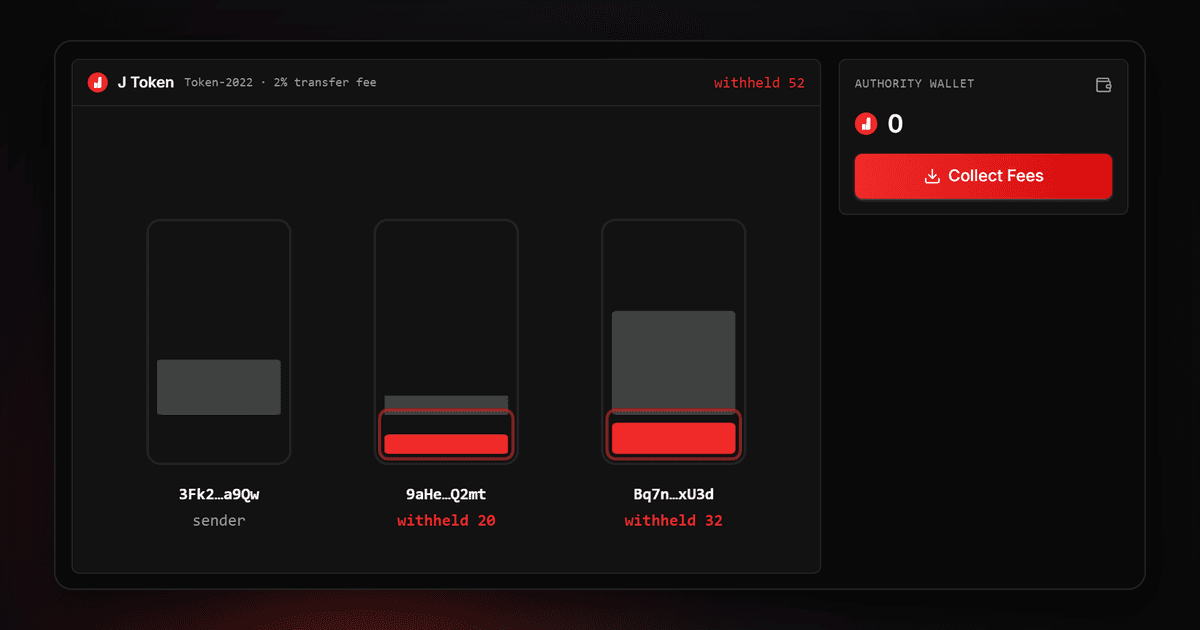
- Transfer fee. A built-in cut taken automatically from every transfer, set as a percentage with a maximum cap. The collected fee accumulates in a wallet you control and can be swept later. It is not "trust me, my smart contract collects fees", it is a hard rule baked into the token itself, so no one can route around it.
- Interest bearing. The balance shown in wallets appears to grow on its own at a rate you configure. Useful for yield-bearing stablecoin variants where you want the displayed amount to drift upward without any background service.
- Frozen by default. Newly created token accounts arrive frozen. The holder cannot move balance until someone with the freeze authority signs off. This is the foundation of permissioned distributions, KYC-gated airdrops, and any flow where you need to approve each holder.
- Memo required on transfer. Every incoming transfer must carry a note (an invoice number, a customer ID, a description). Practical for fiat-backed stablecoin issuers who need to talk to banking partners.
- Close authority on the mint. Once total supply is back to zero, the mint itself can be shut down and the small reserved deposit reclaimed. The classic standard leaves empty mints sitting around forever; this is a cleaner end of life.
- Non-transferable. A token whose holder cannot send it to anyone else. It sticks to the wallet it lands in. Right tool for badges, membership cards, identity tokens, or proof-of-attendance receipts.
- Permanent delegate. One specific wallet that can move any holder's balance, forever. Extremely powerful and equally dangerous. Only appropriate for regulated issuers who legally must be able to claw funds back.
- Transfer hook. A custom program you wrote runs an extra check on every transfer. Things like "never let anyone send to this wallet", or "siphon 1% of every transfer to this address". The most powerful extra is also the trickiest, because every DEX or aggregator has to add your hook to its safe list before it will route through.
- Built-in metadata. The token's name, symbol, and logo live inside the mint itself instead of in a separate account. One fewer thing to fetch, one fewer thing to manage.
The extras set is locked in when you mint. You cannot decide a week later that you want to add a transfer fee. Same one-way logic as authority revoke on classic SPL: the decision happens at minute zero and stays.

The compatibility reality check
Token-2022 looks like a clean upgrade on paper. In production it has rough edges, and you need to know where they are before you commit.
Raydium's standard pools reject Token-2022. Raydium's original pool factory was written against the classic standard and was not rebuilt for the new token shape. Their newer pool types added partial support, but transfer-fee tokens specifically get refused in the parts of the swap math that assume "what goes in equals what comes out". If your launch plan depends on Token-2022 hitting Raydium on day one, test it in the real pool factory first, not on a slide.
Jupiter routes most extras, but not all. Jupiter has invested heavily in Token-2022 support. A clean Token-2022 mint with built-in metadata or interest bearing usually routes without issue. A mint with a transfer hook is a different story: Jupiter has to add your specific hook program to its safe list, and until it does, your token quietly falls out of search results. New hook programs do not appear in routes by magic.
Wallets show the balance, but the extras UI varies. Phantom, Backpack, and Solflare all read Token-2022 balances and display them like any other token. Where they differ is how they explain the extras to the user. A transfer fee deducted at send time, interest accruing on the displayed amount, a frozen-by-default account state, a memo-rejected transfer; each wallet shows some, hides others, and warns on a few. Expect users to panic the first time they enter 100 and the recipient gets 99.
Swap sites and explorers vary too. Solscan and Solana FM read Token-2022 metadata and balances correctly. Older third-party aggregators may misreport supply because they never updated their parsers. NFT marketplaces are a separate world, but if you are minting a non-transferable token, do not expect any marketplace UI to handle it; the listing flow will break before the sale logic ever runs.
Before you commit to a Token-2022 launch, do a small real test on mainnet: mint a throwaway token with the same extensions, put it in a tiny pool, pull a Jupiter quote, and try the actual integration you depend on yourself. Devnet works for testing your own code, but Jupiter and the J Tools Token-2022 creator only run on mainnet. "Token-2022 is supported" is true; "your specific combination of extras is supported" is the sentence that kills launches, and it is the one you have to verify by hand.
Which extension works on Raydium, Jupiter, and wallets
The section above told you where the friction is. This table shows the same thing extension by extension: which Token-2022 feature passes cleanly on each platform, which one is conditional, and which one breaks outright. One fact first. Raydium's classic AMM pools never accept Token-2022 at all, so the Raydium column below assumes the newer CPMM pools.
| Extension | Raydium (CPMM pool) | Jupiter (swap route) | Wallets (Phantom, Solflare, Backpack) | CEX listing |
|---|---|---|---|---|
| Transfer fee | Partial | Works (fee shown) | Works | Rare |
| Transfer hook | Breaks | Whitelist needed | Partial | No |
| Interest-bearing | Works | Works | Works | Partial |
| Default frozen account | Partial | Partial | Works (needs approval) | Hard |
| Non-transferable (soulbound) | No | No | Works (stays in wallet) | No |
| Permanent delegate | Works (risky) | Works (may warn) | Works | Hard |
| Memo-required transfer | Breaks | Breaks | Partial | Hard |
| Embedded metadata | Works | Works | Works | Works |
| Close mint authority | No effect | No effect | No effect | No effect |
Reading guide, kept short. Works means you can turn the feature on and use it as expected on that platform. Partial means it passes in most cases but can snag depending on pool type, wallet version, or token amount. Whitelist needed means the token stays invisible until the platform adds your program to its safe list. Breaks means that combination does not work in practice today. No effect means the extension never touches transfer or swap logic, so it causes no trading trouble.
The practical read is clean. For wide DEX and exchange reach, embedded metadata and interest-bearing are the two safest extensions. Transfer hook and memo-required transfer sit at the narrow end; a mint with both drops out of most liquidity pools and search results. Transfer fee lands in the middle, since Jupiter routes it while exchange listings and some Raydium pools push back. Keep this table open next to the Token-2022 creator as you toggle each extension.
Think about extensions one at a time, not as a bundle. A clean metadata mint travels everywhere, yet adding a transfer hook to that same mint can pin it to a narrow list overnight. For the fewest compatibility surprises, enable the one extension your project actually needs and leave the rest off.
Token-2022 vs SPL token decision table: which one fits your project
| Project type | Recommended standard | Why |
|---|---|---|
| Memecoin or community token | Classic SPL | Maximum DEX and wallet coverage, zero compatibility surprises, lowest mint cost. |
| Token that earns revenue on every transfer | Token-2022 (transfer fee) | The fee is enforced inside the token, no extra contract needed. Confirm DEX support before launch. |
| Compliance-friendly stablecoin | Token-2022 (memo required, permanent delegate) | On-chain memo for off-chain reporting, clawback authority for regulators. |
| Yield-bearing token | Token-2022 (interest bearing) | Yield is rendered inside the wallet without a side service. |
| Soulbound badge or identity token | Token-2022 (non-transferable) | The transfer block is part of the standard, so user mistakes cannot unwind it. |
| Tokenized real-world asset | Token-2022 (frozen by default, permanent delegate) | Holders go through explicit approval, issuer keeps a regulatory recovery path. |
The pattern is simple. If you only need "the token gets held, sent, and optionally has its authorities revoked", classic SPL gets you there faster and with fewer integration surprises. If you need anything more on top, Token-2022 is the answer.

Two concrete worked examples
Imagine you are launching a community keepsake token and your top priority is getting listed on Binance, Bybit, or Gate as quickly as possible. The right call is classic SPL. Vanilla flavor, everyone understands it, no extra integration questions, listing review is a fast yes. The SPL token creator tool handles the entire flow in one form: pick supply, pick decimals, upload a logo, revoke authorities, sign once.
Now imagine instead that you are launching a DAO token where you want 1% of every transfer to flow into the treasury automatically. With classic SPL, this is impossible without writing a custom smart contract, and even then most DEXes will route around your fee. With Token-2022's transfer fee extra, you set 1% at mint time and no user, no DEX, no wallet can bypass it. The treasury wallet fills itself. The Token-2022 creator tool walks you through the extras list and composes the mint in one signed transaction.
Authority controls work for both standards. The make metadata immutable tool locks token info on either side, and the update metadata tool lets you change logos and links on mints that are still mutable. If you want to clean up after a campaign, the burn tokens tool works on both standards, and the token snapshot tool captures holder balances on either side for airdrops or governance.
Five common mistakes
- Choosing Token-2022 because it sounds newer. "We use the newest standard" is not a launch advantage if your DEX pool refuses your token. Pick on technical fit, not on a press release.
- Stacking too many extras. Every extra adds a reason for an integration partner to refuse you. A Token-2022 mint with transfer fee plus transfer hook plus frozen-by-default account state will fail Jupiter routing, fail most pool factories, and lose holders who cannot move their balance.
- Setting transfer fee too high. A 5% transfer fee crushes secondary liquidity. Liquidity providers watch their balance decay on every rebalance and leave. Most transfer-fee tokens that survive in the wild stay under 2%, and the common range is 0.5% to 1%.
- Permanent delegate on a community token. The permanent delegate can move any wallet's balance. If holders find that in your mint configuration, your listing gets flagged on every Solana risk scanner within hours; what a honeypot token is shows why buyers read it that way.
- Forgetting that classic SPL authority revoke is one-way too. Both standards make irreversible decisions at mint config. Read each toggle twice before you sign.
For more launch-side writeups, the Solana guides category covers adjacent ground (LP setup, snapshot airdrops, holder analytics), and the Solana tagged posts page collects the full feed.
The SPL versus Token-2022 choice is a product decision in technical clothing. The standard you pick locks in what your token can and cannot do for its entire life. Match it to what your project actually needs, not what sounds more advanced in a Twitter thread, because the day after you sign, the answer is frozen.
What is an SPL token?
An SPL token is a fungible asset issued under Solana's original token program, the Solana Program Library token standard. In plain terms, "SPL token" is what people mean when they say "a Solana token" with no qualifier: a mint account that defines supply and decimals, plus per-holder token accounts that hold balances. The meaning is deliberately narrow. The token exists, it has a fixed set of authorities, and it moves between wallets when someone signs a transfer. Nothing runs in the background.
Every SPL token has two switches worth knowing about at creation: the mint authority (can new units be created later?) and the freeze authority (can a holder's balance be locked?). You decide whether to keep or hand off each one.
Most launches give both away to signal a fixed, hands-off supply, which you can do at mint time or afterward with the revoke mint authority tool and the revoke freeze authority tool. Those revokes are one-way: once signed, the authority is gone for good. Revoking mint, freeze and update authority covers each one in order.
What is Token-2022 (Token Extensions)?
Token-2022, also called Token Extensions, is a separate token program that runs next to the classic one, documented in full in Solana's token extensions reference. It speaks the same wallet language and produces something a user still sees as a normal token, but at mint time it lets you opt into behaviors the original program never had: transfer fees, interest-bearing display, frozen-by-default accounts, required transfer memos, non-transferable tokens, and more. The full extension set and how j.tools surfaces each one is covered in the section above.
The mental model that avoids mistakes: SPL Token and Token-2022 are two different programs, not two versions of one. A mint lives under exactly one of them, chosen at creation, and it never migrates. That single fact drives the compatibility differences, because every wallet, pool, and aggregator has to handle each program separately.
Token-2022 vs SPL token: feature by feature
The same comparison the decision table makes, broken out point by point for the head-to-head questions people actually search:
- Program identity. SPL Token is the classic program; Token-2022 is a distinct program ID. A mint belongs to one of them permanently.
- Extra behaviors. SPL Token has none beyond mint and freeze authority. Token-2022 adds opt-in extensions (transfer fee, interest bearing, non-transferable, transfer hook, permanent delegate, and others).
- Metadata. Classic SPL stores name, symbol, and logo in a separate metadata account. Token-2022 can embed metadata inside the mint itself.
- DEX and aggregator support. SPL Token routes everywhere with zero friction. Token-2022 routes on most venues, but specific extensions (transfer-fee and transfer-hook mints especially) get refused by some pools until each integrator adds support.
- Authority behavior. Both expose mint and freeze authority, and both make revokes irreversible. Token-2022 adds extension-specific authorities (fee config authority, close authority on the mint) that classic SPL has no concept of.
- Best fit. SPL for memecoins, governance tokens, and anything you want listed fast with no edge cases. Token-2022 when a launch genuinely needs an on-chain rule the classic standard cannot express.
If your requirement list is just "hold, send, and lock the authorities", classic SPL is the lower-risk path. Reach for Token-2022 only when a specific extension is load-bearing for the product.
spl-token CLI vs a no-code mint
The official way to mint either standard is the spl-token command-line tool from Solana's CLI suite. With spl-token-cli you create a mint, set decimals, mint supply to an account, and disable the mint or freeze authority, all from a terminal. It is precise and scriptable, and it is the right choice if you are already comfortable funding a keypair, managing RPC config, and reading raw account output.
The catch is that the CLI assumes you can drive a Solana environment by hand, and one wrong flag is permanent. A browser tool covers the same actions through your wallet without exposing a private key. You can mint a classic token with the SPL token creator tool on this site or an extensions mint with the Token-2022 creator tool, set the same supply, decimals, and authority revokes, and sign each step in Phantom or Backpack.
Same on-chain result, fewer ways to break yourself. Whichever route you pick, the underlying program and the irreversibility of authority revokes are identical, so the standard you choose still matters more than the tool you use to mint it.
Token-2022 vs SPL token FAQ
Why doesn't my transfer-hook token show up on Jupiter?
Jupiter has to add each transfer-hook program to its safe list first. Until your program is on that list, the token quietly falls out of routes and never surfaces in search. A mint without a hook does not hit this wall.
Can I open a Raydium pool for a Token-2022 mint?
Not on the classic AMM pools. On the newer CPMM pools, yes for some extensions, though transfer-fee and memo-required tokens can get refused by the swap math. Open a real pool once before you build a launch plan on it.
Does Phantom show a Token-2022 balance?
Yes. Phantom, Solflare, and Backpack read the balance and list it like any token. The difference is how they explain the extension. A transfer fee is deducted at send time, so a user may be surprised that they sent 100 and only 99 arrived. Warn your community ahead of time.
Will a centralized exchange list my Token-2022 token?
Plain extensions like embedded metadata or interest-bearing rarely cause trouble. Transfer fee, permanent delegate, and transfer hook break most exchange accounting and custody flows, so they get accepted rarely. If a CEX listing is the goal, keep extensions minimal.
Can I switch a classic SPL token to Token-2022 later?
No. The standard is locked at mint time and the token's program id never changes. If you start on the wrong one, you mint a new token and migrate holders. The token creation guide walks through getting the first mint right.