Wrapped SOL Explained: When to Wrap and When to Unwrap
What wrapped SOL (wSOL) is, why DeFi needs it, and exactly how to wrap and unwrap: including the wSOL balance stuck in Phantom after a swap. Step-by-step.

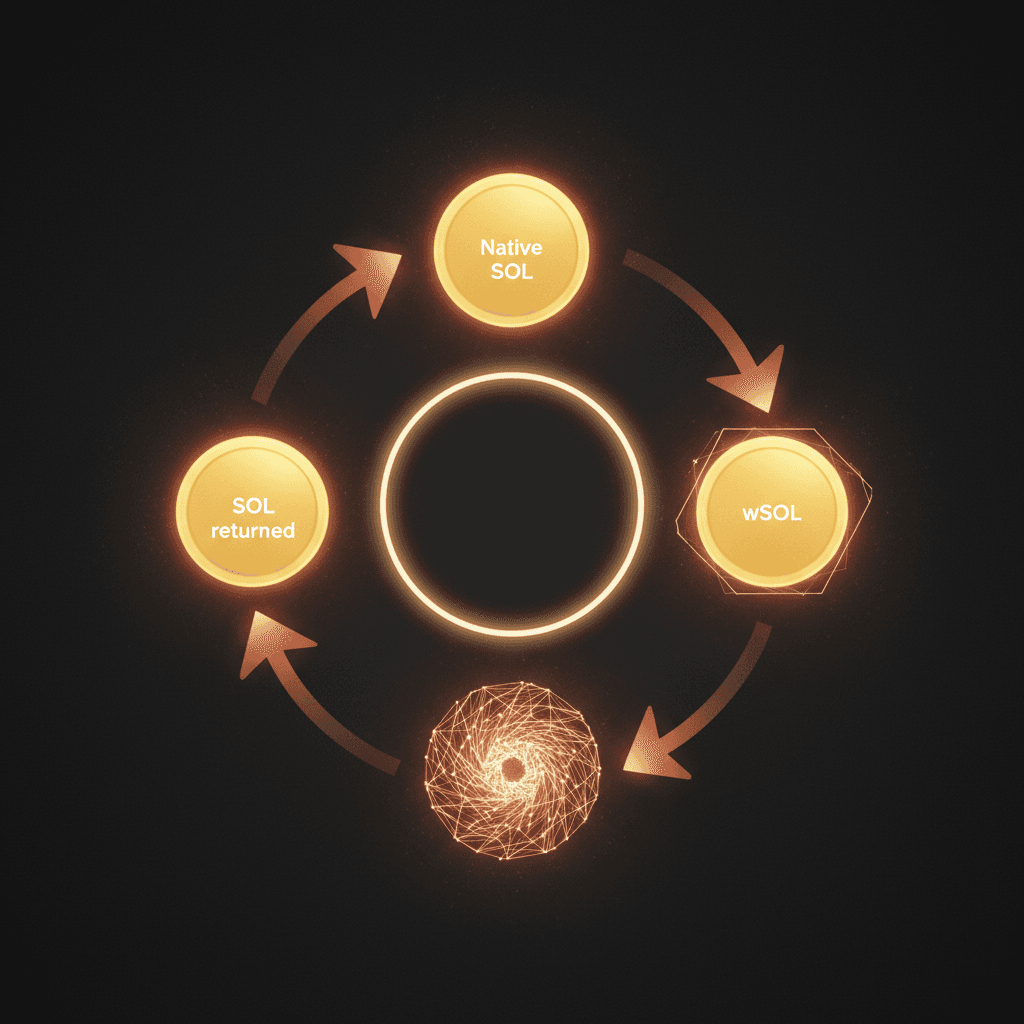
Native SOL is like cash in your pocket. You spend it directly, you pay gas with it, you send it to a friend. wSOL, short for wrapped SOL, is the exact same value wearing a different outfit. Same buying power, different rulebook. SOL is the chain's native fuel, but most platforms like Raydium and Jupiter were built to handle regular tokens, not the fuel itself. wSOL exists to bridge that gap. It is SOL pretending to be a token so token-only systems can use it.
If you have ever finished a swap and noticed a stray 0.0001 wSOL line in your wallet, or tried to add liquidity on Raydium and the interface refused because "no wSOL balance found", nothing broke. That is just how Solana DeFi is wired. This guide explains what wSOL really is, why it has to exist, when you genuinely need to wrap it by hand, when you need to unwrap to get gas money back, and how to clean up the dust accounts that farming leaves behind.
What wSOL really is
wSOL is a normal token on Solana. It is not a bridged asset from another chain, it is not a synthetic derivative, it is not a wrapped copy of anything else. Every 1 wSOL in your wallet is backed by exactly 1 real SOL sitting locked inside a special account that holds tokens for your wallet. No yield, no drift, no validator exposure. The value stays glued to SOL one for one.
The whole thing works because Solana's token system does not special-case wSOL accounts. It treats them like USDC, BONK, or any meme coin you minted yourself. The only quirk is that when you close a wSOL account, the locked SOL automatically flows back into your wallet as native SOL. That is the trapdoor that makes wrapping and unwrapping painless.
Quick note: wSOL is not the same as stSOL, jitoSOL, mSOL, or bSOL. Those are liquid staking tokens, receipts for SOL handed to validators, and they grow in value over time. wSOL is always 1 to 1 with native SOL. No yield, no drift, no validator exposure.
SOL vs wSOL at a glance
If you remember one thing, remember this: the value never moves. One wSOL is always one SOL, and you can go back and forth whenever you want. What changes is the shape your SOL is in and where that shape gets accepted.
| Feature | SOL (native) | wSOL (wrapped) |
|---|---|---|
| What it is | Solana's own coin, the network's cash | The same SOL in standard token form |
| Format | Native coin, not an SPL token | SPL token, the format apps recognize |
| Pay network fees with it? | Yes, directly | No, unwrap to SOL first |
| Where you mostly use it | Holding, paying fees, sending | Liquidity pools and apps that need the token form |
| Value | Always 1:1 with wSOL | Always 1:1 with SOL |
| How to convert | Wrap it to get wSOL | Unwrap it to get SOL back |
The practical read: hold and spend in native SOL, and reach for wSOL only when a pool or contract asks for the token form. Both directions run through the wSOL wrapper in a single click, and the wrapped balance sits in a token account you can close later to get your rent deposit back.
The short version: same value, different plumbing. One wSOL is always worth one SOL, no premium and no discount. What changes is how the network handles each one.
- Native SOL pays your transaction fees and rent. It lives in your wallet account directly, with no separate token account involved.
- Wrapped SOL (wSOL) sits inside an SPL token account, the same kind that holds USDC or any meme coin. It cannot pay gas. To spend it as gas you have to unwrap it back to native SOL first.
Think of native SOL as cash and wSOL as that same cash loaded onto a prepaid card. The card works everywhere that reads cards (token-only DeFi programs), but you cannot feed it into a meter that only takes coins (the fee system). When you need coins again, you cash the card out. That cash-out is exactly what unwrapping does.
Why wrapping is needed
Most DeFi apps on Solana are written with one assumption baked in. Every incoming asset is a regular token. A liquidity pool holds two tokens, manages two token accounts, and swaps between them using token transfers. Native SOL is none of those. It is the chain's own fuel, and moving it works through a completely different system.
That is why the SOL/USDC pool on Raydium is really a wSOL/USDC pool (how the big venues differ is covered in Jupiter vs Raydium vs Orca). Open a position on Orca with SOL and the program quietly creates a wSOL account on your behalf. Jupiter hides the same trick at the user interface level.
You see SOL in the dropdown, but the first step of your route is a wrap and the last step is an unwrap. The Jupiter swap terminal on j.tools follows the same playbook. You pick "SOL in, USDC out" and the wSOL bookkeeping happens under the hood, completely invisible to you.
Manual wrapping is rare, but when you hit a situation that needs it, nothing works until you do. Our liquidity and token operations guides cover most of these stuck states with the exact button order.
When to wrap by hand
Three practical cases come up. The first is when an automated market maker expects both sides of a position to already exist as token accounts. Raydium CLMM, Meteora DLMM, and Orca Whirlpool position openers sometimes auto-wrap for you and sometimes do not. When they do not, the transaction simulates fine and then fails on chain with an "insufficient wSOL balance" error.
The second is sending SOL to a contract that only listens for token transfers. Some yield farms, staking pools, and custom launchpad contracts ignore native SOL entirely. Send native SOL and the transaction either reverts or, more painfully, passes at the ledger level while the contract ignores your deposit. Recovery usually means a support ticket and crossed fingers.
The third is folding SOL into a single atomic step. When you fire create LP and buy in one block, one leg of the operation opens the pool and another spends SOL on the first buy. SOL has to already be wSOL by the time that step runs. There is no room for a separate wrap inside the same atomic bundle. Wrap first, then run the combo.

Wrapping SOL for liquidity pools and DeFi
Here is the part that trips people up: most of the time you do not wrap by hand for a pool at all. A pool holds two token sides, and both have to be in SPL form. When one side is SOL, that portion has to become wSOL before it can sit in the pool next to the other token.
The good news is that the pool tools handle the switch for you. When you add liquidity through the liquidity add/remove tool or open a new pool with Create LP, the SOL side gets wrapped inside the same flow. Pull your liquidity back out later and the SOL side unwraps on its own, landing in your wallet as native SOL again.
Wrapping opens a token account, and that account holds a small rent deposit of roughly 0.00149 SOL. It is not a fee and it is not gone. Close the account once you are done and the deposit comes back to you. Leaving stray wSOL accounts open across a dozen pools is how people slowly lock up a few tenths of a SOL without noticing.
So when do you still wrap by hand for DeFi? Two cases. Some concentrated-liquidity position openers want you to hold wSOL before they build the position, and some strategies bundle a wrap with other steps in one atomic transaction. For those, wrap the exact amount ahead of time with the wSOL wrapper, use it, then unwrap whatever is left. The value stays 1:1 the whole way through, so the conversion itself puts nothing at risk.
When to unwrap
Unwrapping shows up in two places. The first is finishing a swap with the route landing on wSOL while your wallet is waiting for native SOL to pay gas or to fund an exchange withdrawal. This happens with certain Jupiter routes and with direct Raydium swaps. Centralized exchanges look at the token address and reject wSOL as an unknown token, so unwrap before any deposit.
The second is reclaiming the small rent fee that every wSOL account holds. An empty wSOL account locks up to roughly 0.002 SOL as rent. After dozens of farming rounds, snapshots, and airdrop campaigns, you can easily end up with 30 or 40 dust wSOL accounts on your address.
The close-account tool for a single token slot handles one at a time. For cleanup at scale, the batch collector for sweeping dust slots closes them in bulk and credits the rent back to your wallet. Every way to recover that locked SOL is laid out in pulling SOL back from empty accounts.
| Use case | Wrap by hand? | Relevant tool |
|---|---|---|
| Buying a token on Jupiter | No, fully automatic | /tools/swap |
| Opening a Raydium CLMM position | Usually yes | /tools/wsol-wrapper |
| Withdrawing SOL to a CEX | Unwrap first if balance is wSOL | /tools/wsol-wrapper |
| Closing dust wSOL accounts for rent | Unwrap and close | /tools/batch-collector |
| Building a holder snapshot | Not relevant | /tools/token-snapshot |
Step by step on the j.tools wsol-wrapper
The tool is intentionally two buttons. Connect a wallet, pick a direction (Wrap SOL into wSOL or Unwrap wSOL back to SOL), enter an amount or hit "max", and sign one transaction. That is the whole flow.
Behind that single signature, here is what happens. On the wrap side, if your wallet does not yet have a wSOL slot, the wsol-wrapper tool creates one first. Then it moves the requested amount of SOL into that slot and updates the balance so the number you see matches the value inside.
On the unwrap side, the tool closes the wSOL slot entirely. Locked SOL ships back to the owner wallet, and the rent deposit is refunded at the same time. Unwrap 1.5 wSOL and you receive 1.5 SOL plus up to roughly 0.002 SOL of rent back to your address.
Heads up: there is no such thing as a partial unwrap. Closing the slot closes everything. If you wrap 1 SOL, use half, and then want to pull the other half back, the account closes outright and your next wrap creates a fresh slot from scratch. If you cycle wrap and unwrap constantly, you are paying that rent deposit again every single time.
Common mistakes
Sending native SOL to a contract that only accepts token transfers is the classic. The transaction either reverts or, more painfully, passes at the ledger level while the contract ignores it. Recovery means hoping the contract has a sweep function or that the team responds to support tickets.
Confusing wSOL with liquid staking tokens like stSOL, jitoSOL, mSOL, or bSOL is the next one. Those are validator receipts. They earn yield, drift away from a clean 1 to 1 ratio with SOL over time, and require a trip through their staking protocol to redeem. If a tool labels something "wSOL" but the address points to jitoSOL, the labelling is wrong. Stop before you sign.
Dust accumulation is third. Every failed swap, every closed liquidity position, every retired bot run can leave a tiny wSOL slot behind. Up to 0.002 SOL per slot sounds small until you have 50 of them and realize that can be 0.1 SOL of dead rent. Before you fan out with a multi-sender batch payout or burn old token positions, sweeping the wSOL slots in the same session keeps the wallet honest.
A fourth one is a habit worth building. Always make sure you keep enough native SOL in your wallet for gas before you wrap. If you wrap every last bit, you cannot sign the next transaction because there is nothing left to pay the fee with, and the insufficient funds for rent error is usually what that looks like. Our Solana user notes have more habits like this one for wallet hygiene.
Next time you see a 0.0001 wSOL line in your wallet, you already know what it is, why it ended up there, and which single button gets it back to native SOL.
How to unwrap SOL on Phantom (step by step)
Phantom does not always show a wSOL line in its main token list when the balance is tiny, which is why people think their SOL vanished after a swap. The wSOL is still there, it just lives in a token account. Here is the reliable way to turn it back into spendable SOL.
- Open the wrap and unwrap wSOL tool and connect your Phantom wallet.
- Switch the direction to Unwrap wSOL back to SOL. The tool reads your wSOL balance for you, so you do not have to hunt for it inside Phantom.
- Press max to pull the full balance, then sign the single transaction Phantom pops up.
- The wSOL account closes, the locked SOL lands back in your wallet, and the rent deposit (up to around 0.002 SOL) is refunded in the same step.
If the wSOL is spread across several wallets, for example a batch of farming or bot addresses, doing this one at a time is slow. Unwrap wSOL across many wallets at once handles the whole set in one session instead.
Always leave a little native SOL in the wallet before you start. If every last lamport is wrapped, there is nothing left to pay the fee for the unwrap transaction itself.
The wrapped SOL token address (and how to verify it)
There is exactly one real wSOL mint on Solana mainnet, and it never changes:
So11111111111111111111111111111111111111112
This mint is owned by the SPL Token program and has 9 decimals, the same as native SOL. Anything calling itself wSOL under a different address is not the canonical wrapped SOL, and you should treat it as a separate, unrelated token.
To verify before you sign anything, paste the address into a block explorer like Solscan and confirm two things: the mint matches the string above character for character, and the decimals read 9. Scam tokens routinely borrow the wSOL name and logo while pointing at a different mint, so the address is the only field that actually proves what you are holding.
wSOL FAQ
What does wrapped SOL mean?
Wrapped SOL means native SOL deposited into an SPL token account so token-only programs can read and move it. The value is unchanged, one wSOL equals one SOL, and the original SOL stays locked inside the account until you unwrap it.
Can I lose money wrapping SOL?
The wrapped amount itself is never lost, it stays one for one with SOL. The only cost is the small rent deposit (roughly 0.00149 SOL) each token account holds while open, and even that comes back when you close the account. The mistake that actually loses value is sending native SOL to a contract that only accepts token transfers.
How do I convert wrapped SOL back to SOL?
Unwrap it. Closing the wSOL token account releases the locked SOL as native SOL and refunds the rent in the same transaction. The wrap and unwrap wSOL tool does this in one signature, no partial amounts, the whole balance comes out at once.