Claim Fees on Solana: Creator, LP, Tax and Rent in One Place
Four kinds of Solana fees wait outside your wallet balance: creator, LP, Token-2022 tax and rent. See where each sits and how to claim all four in one pass.
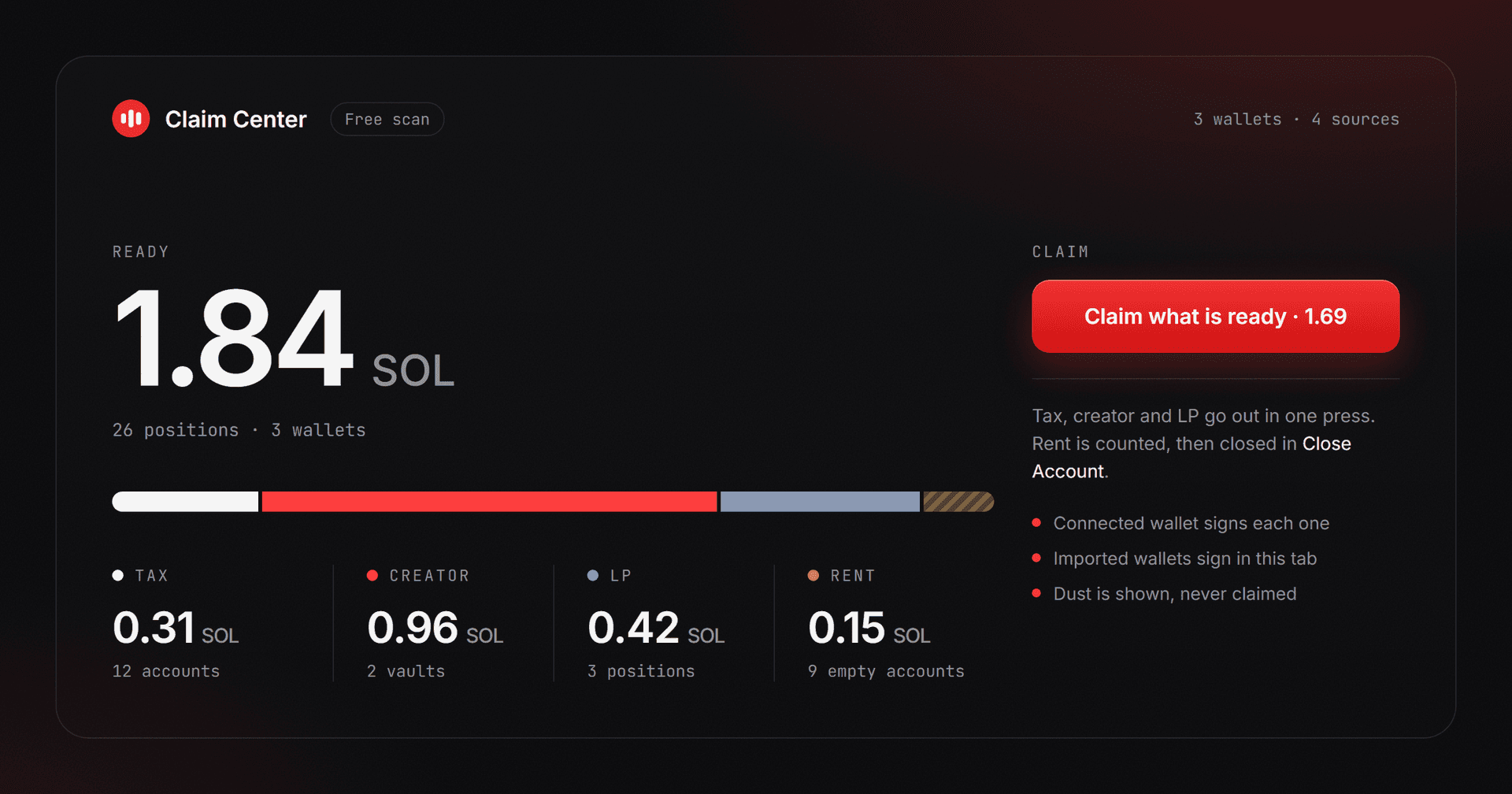
A Solana wallet can be owed money and show no sign of it. Four kinds of fees build up in places a wallet app never lists: creator fees in launchpad vaults, swap fees on liquidity positions, Token-2022 transfer tax inside holder token accounts, and rent inside empty token accounts. Each has its own claim step and its own signer.
This guide shows where each one sits, who can claim it, what a claim costs and how to check all four in a single pass.
Why unclaimed fees never show up in your wallet
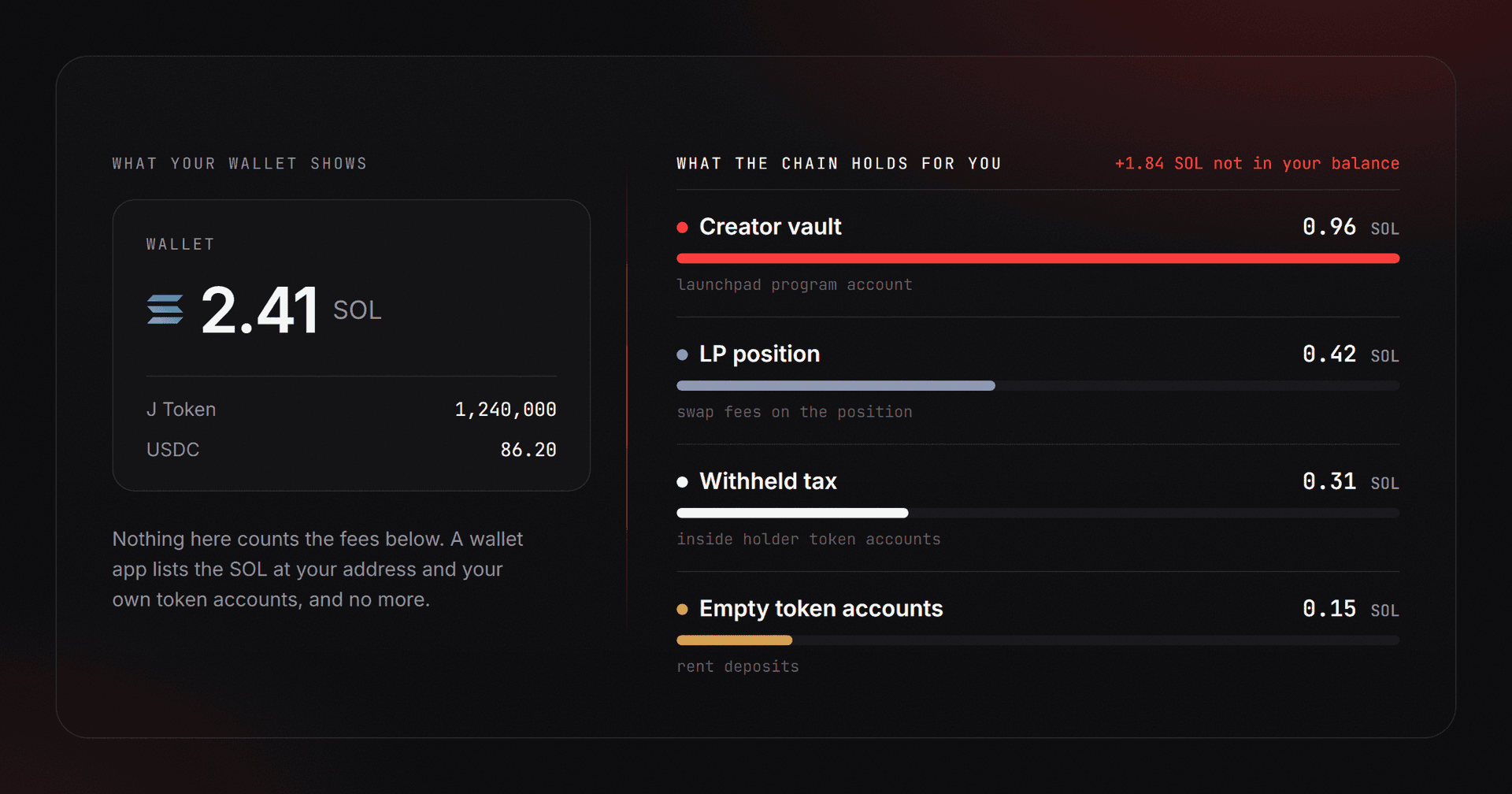
A wallet app lists the SOL at your address and the token accounts your address owns. Nothing else appears, and none of the four fee types lives at your address. Creator fees sit in a vault account derived by the launchpad program. Swap fees sit on the liquidity position, not in the wallet that opened it. Token-2022 transfer tax sits inside the token account of whoever received the transfer. Rent sits as a deposit inside empty token accounts you may have forgotten you own.
So a portfolio tracker reads zero while the chain holds money owed to you. The balances are public, and anyone can look up what an address could claim. Moving the money takes the owner's signature, every time.
The four kinds of claimable fees at a glance
| Fee | Where it waits | Who can claim it | Claim tool |
|---|---|---|---|
| Creator fees | A launchpad vault: Pump.fun creator vault, PumpSwap vault token account, Raydium LaunchLab creator vault | The creator wallet | Creator Fee Claim |
| LP fees | The position itself: Raydium CLMM, Meteora DLMM and DAMM v2, Orca Whirlpool | The wallet that owns the position | LP Fee Claim |
| Token-2022 transfer tax | Withheld inside holders' token accounts | The mint's withdraw authority | Token-2022 Tax Collector |
| Rent | Every empty token account | The wallet that owns the account | Close Account |
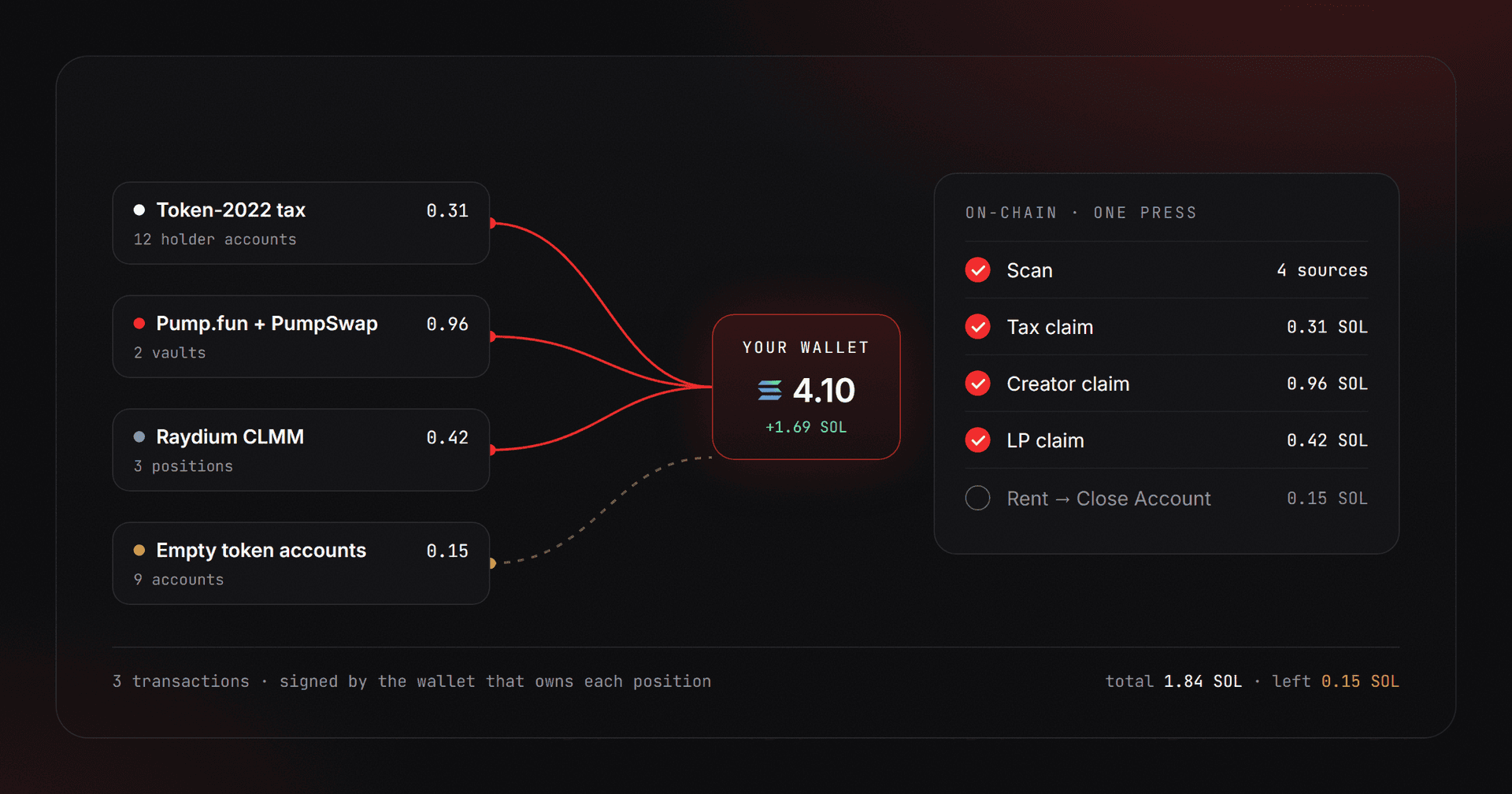
Claim Center reads all four sources for the wallets you give it and shows one total. The rest of this guide takes the sources one at a time, because each behaves differently once you try to collect.
Creator fees: Pump.fun, PumpSwap and Raydium LaunchLab
Launchpads pay creator fees into a vault tied to the creator's address. Pump.fun keeps one SOL vault per creator, not per coin, so every coin launched from the same wallet pays into the same place. After a coin graduates, PumpSwap pays into a separate vault token account. Raydium LaunchLab keeps its own creator vault for each quote token.
Only the creator wallet can sign the claim. If you launched from a wallet whose key you no longer hold, no tool can send those fees anywhere else. The vault guide covers each vault address, how to check it on an explorer and what a claim does: Pump.fun Creator Vault: where your creator fees go. Launches on Meteora's Dynamic Bonding Curve and on Bags are not connected yet, so the scan lists them as unavailable.
LP fees: which pools keep them separate from liquidity
Concentrated and bin-based pools keep trading fees on the position, separate from the liquidity, until the owner collects them. That covers Raydium CLMM, Meteora DLMM and DAMM v2, and Orca Whirlpool positions. Collecting pays out both tokens of the pair, and each position needs its own signature.
Constant-product pools work the other way. On Raydium standard pools and PumpSwap, fees join the reserves, so there is no separate claim. They show up as a larger withdrawal when you remove liquidity, and the scan marks those positions as compounding. The reasoning behind the split is in Where Do LP Fees Go? Pools vs Concentrated Liquidity.
A position is dust when its unclaimed fees are worth less than the network fee needed to collect them. The tools still show it but never select or claim it, because collecting it would cost more than it returns.
Token-2022 transfer tax: withheld inside holder accounts
With a Token-2022 transfer fee, nothing is sent to anyone when a transfer happens. The tax stays withheld inside the token account of the holder who received the tokens. The wallet set as withdraw authority at creation receives nothing at that moment, and it is the only address allowed to move the withheld amount out.
Anyone can harvest withheld fees from holder accounts onto the mint, but only the withdraw authority can take them from there. If that authority was revoked, the withheld tax can never move again. Collecting does not touch holder balances, because inside each account the withheld amount is already tracked apart from them. The mechanics are explained step by step in What Is a Solana Tax Token? Token-2022 Transfer Fees.
Collect the tax before you clean up. A token account that still holds withheld fees refuses to close, so a rent cleanup run first cannot close those accounts.
Rent: the deposit inside every empty token account
Every token account locks a refundable deposit, up to about 0.002 SOL. Solana's accounts documentation describes this deposit as a refundable minimum balance that grows with the account's data size. Selling a whole balance leaves the account open with the deposit still inside, and closing the account returns the deposit to your wallet. The network has been lowering the deposit since September 2026, so the exact figure moves. The Close Account screen shows the current amount for each account.
Claim Center counts rent in its total but does not close accounts itself. Its rent button opens Close Account, which closes them in batches. For the full walkthrough of reclaiming the deposits, read Solana Rent Reclaim: pulling SOL back from empty accounts. A transaction that fails because the wallet cannot cover a new account's deposit is explained in the guide to the "insufficient funds for rent" error.
How to claim all four in one pass
- Open Claim Center and connect the wallet, or import several wallets to scan them together.
- Read the scan. The total at the top is the SOL value of everything ready right now, and each source shows its own amount, count and state.
- Press the claim button. It builds one transaction per ready tax, creator or LP item you selected. The connected wallet signs each one, and imported wallets sign in the same browser tab.
- Press the rent button, which opens Close Account, and close the empty accounts there.
A scan only needs a public address. Nobody needs your seed phrase to show you what a wallet could claim, and no claim should ever ask you to send SOL first to unlock a bigger payout. If you import a wallet with its private key, the key stays in that tab's memory and is forgotten on reload, but the safer habit is to connect the wallet and import only dedicated wallets.
What does claiming cost?
Scanning is free. A claim carries a small percentage fee on the value it moves, taken inside the claim transaction itself, and tiny claims are free. The percentage differs by source, and the tool page shows it next to the total before you sign. Close Account keeps 5% of the rent it recovers and charges nothing when a transaction fails.
On top of that, every transaction pays the base network fee, about 0.000005 SOL per signature, plus any priority fee. Claim when the amount clearly beats those costs. Anything below the network fee is not worth a signature.
How often should you claim?
Fees keep accruing whether you look or not, so the right moment depends on what you do next. Claim before you fund the next launch, so earned revenue becomes runway. A burst of trading on a coin you created is another good moment, and so is any time before you close a position or retire a wallet. For a wallet with ordinary activity, a monthly look is enough. After a launch, the post-launch checklist runs through the fee claims and the other cleanup steps in order.
Claiming Solana fees: frequently asked questions
Can I claim fees that belong to someone else's wallet?
No. Anyone can scan a public address and see what it could claim, but each claim is signed by the owner of the vault, position or account, or by the mint's withdraw authority in the case of tax. A tool that promises to move another wallet's fees to you cannot deliver.
Why does my wallet show nothing when the scan finds fees?
Wallet apps list the SOL at your address and your token accounts. Creator vaults and liquidity positions are accounts of their own. Withheld tax sits inside holders' token accounts, apart from their balances. None of it appears in your wallet, and the scan reads it from the chain directly.
Do I need to import private keys to claim?
Not for a single wallet. Connect it and sign each claim in your wallet. Key import is meant for people who manage many wallets and want to claim them in one pass. Imported keys stay in the tab's memory only. Import dedicated wallets rather than your main one.
Is a tiny balance worth claiming?
Usually not. If the fees are worth less than the network fee to collect them, the position is dust. The tools display dust and never claim it. Let small amounts build up and collect them together.
Why will an account not close after I sold everything?
An account closes only when its balance is zero. If the token is a Token-2022 mint with a transfer fee, withheld fees inside the account also block the closing, so collect the tax first. A small leftover balance can be burned and the account closed in one step.
Which launchpads are not covered yet?
Meteora's Dynamic Bonding Curve and Bags launches are listed as unavailable until their adapters ship. Pump.fun, PumpSwap and Raydium LaunchLab creator fees are covered, along with the LP venues in the table above.
Where to go next
For one wallet, start with the free scan in Claim Center and see which of the four sources holds anything. If the creator vaults hold the largest amount, the creator vault guide shows how to read each vault and what a claim does before you sign.